
- by kevinangas@gmail.com
- June 25, 2024
วิธีหา Discord Emoji ID

บทนำ
สวัสดีครับ วันนี้ผมจะพาทุกคนมาหา emoji id สำหรับการนำไปใช้แต่งโปรไฟล์ Discord ในส่วนของรายละเอียด (Description) กันนะครับ ถ้าพร้อมแล้วไปดูกันเลย
1. Copy Emoji ที่ต้องการมาที่ช่องแชท

2. เติม \ ข้างหน้า emoji ที่ copy มาแล้วกด Enter

ในกรอบสีเหลืองคือเวลาเราใส่ \ ลงข้างหน้า emoji ที่เราต้องการ มันจะกลายเป็นโค้ดภาษาอังกฤษแบบนี้นะครับ ไม่ต้องตกใจให้กด Enter ได้เลย
3. ผลลัพธ์ที่ได้ คือ Emoji ID

บริเวณกรอบสีเหลืองคือ emoji id ของ emoji ที่เราต้องการ
4. ประโยชน์ของ Emoji ID
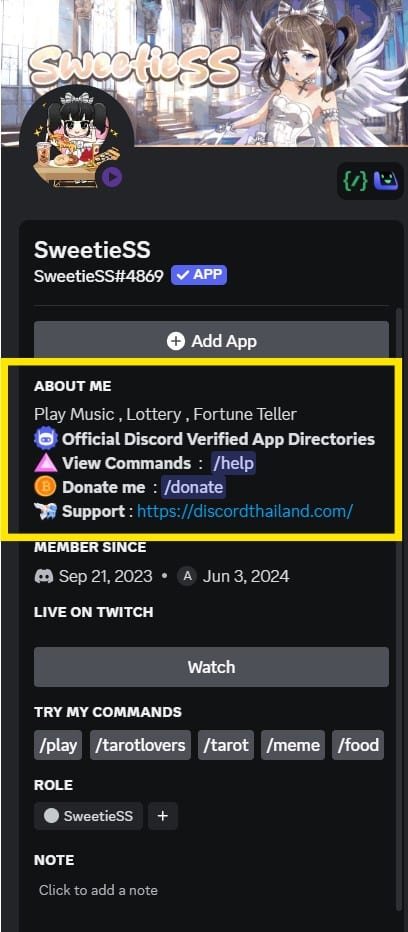
อ่านมาถึงตรงนี้แล้ว ทุกคนคงจะงงกันใช่ไหมครับว่าเจ้า Emoji ID ตัวนี้ มันเอาไว้ทำอะไร ผมจะยกตัวอย่างง่ายๆมาสักตัวอย่างนะครับ Emoji ID ตัวนี้ ถ้าทุกคน Copy ไปแปะที่ Description แนะนำตัวของทุกคนที่โปรไฟล์ Discord ทุกคนสามารถเห็น Emoji แสดงอยู่หน้า Description ได้เลย เจ็งใช่ไหมล่ะ มาดูตัวอย่างกันครับ
4.1 ตัวอย่างการใส่ Emoji ID ที่ Description Profile ใน Discord

4.2 ผลลัพธ์ Emoji แสดงที่ Profile Description ของเรา